

I don't trust a vendor's report until I run the math myself.
26 years in call centers taught me that. One customer taught me the hardest version of it.
That's what Behind the Numbers is for. Every week I take one number from a vendor report. I show where it can go wrong, how to check it yourself, and what a report that actually helps you decide looks like.
This week:
- Why a service level "pass" can be a miss under your contract
- A one-hour check on your vendor's bill
- Why a great liquidation rate can hide weak collections work
All three come back to the same thing.
The vendor's report is a story about the work. The raw data is the work.
When the two don't match, you're the one paying for the gap.
The customer who broke my dashboard
Our weekly dashboard was green. Average wait time was under target. Most calls were answered within two minutes.
Then a customer said this:
"I've called three times. Every time someone transfers me, I start waiting all over again."
I pulled her call history. She was right.
We answered her first call in 48 seconds. Then we sent her to a specialist queue, where she waited 19 minutes and hung up. Our report counted that call as a success.
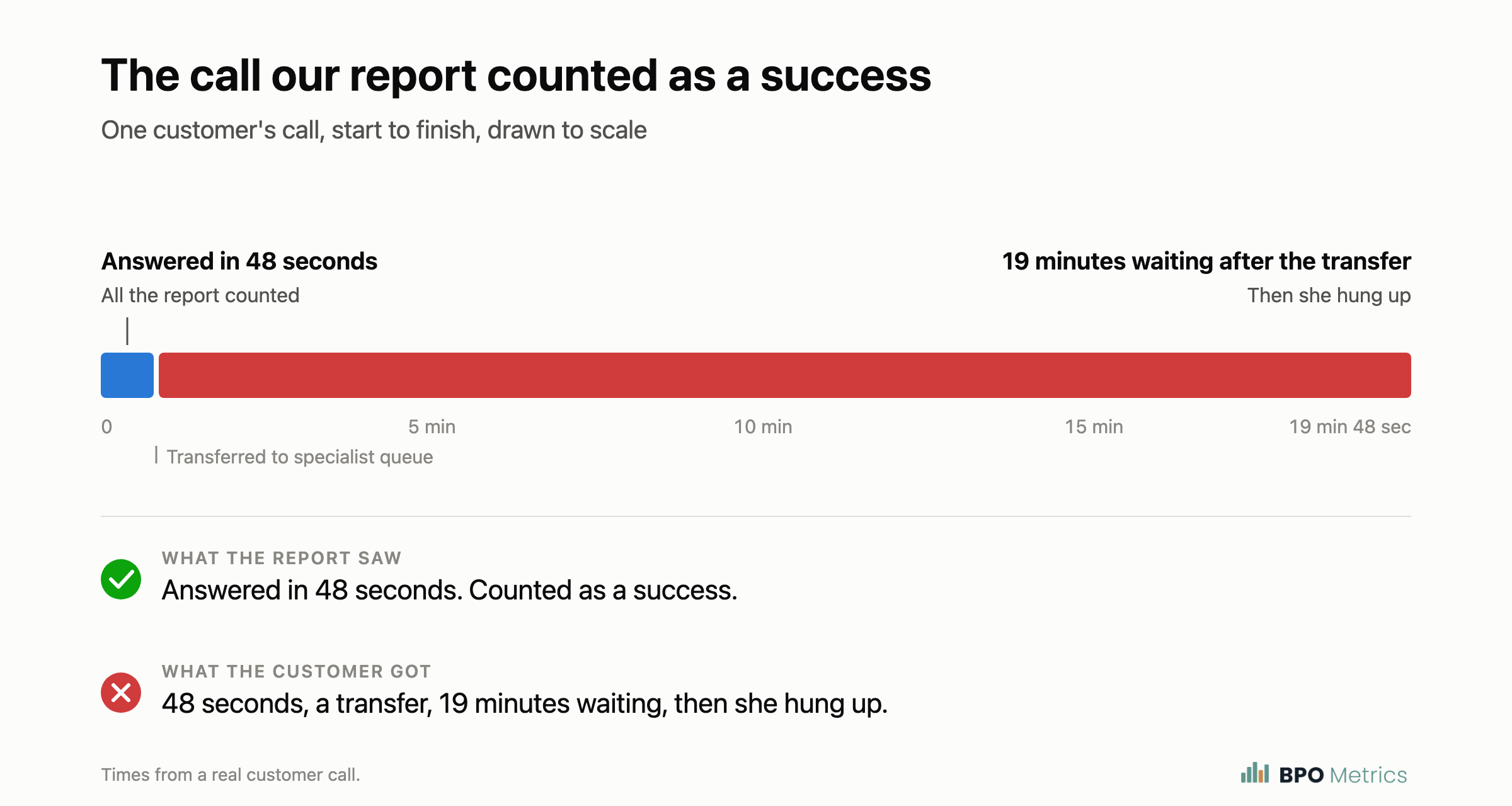
The specialist queue lived in a separate report. Neither report showed her whole call. And our average wait time only counted answered calls, so the people who gave up weren't in it.
Every team could hit its target while the customer still couldn't get help.
We changed the reporting to follow each call through every transfer. We put abandoned calls and repeat callers right next to answer speed. And we moved more staff into the specialist queue during its busiest hours.
The next dashboard had a lot more red. The next operations meeting was a lot more useful.
One check worth running this week
Put last month's vendor bill next to your agent login report. The hours should match.
It takes about an hour:
- Read the contract first. Find out what you pay for: scheduled time, logged-in time, or time spent helping customers.
- Pull billed hours from the invoice, by day if you can.
- Pull agent login hours from the phone system, by agent and by day. If the vendor owns the system, ask for the raw export, not a summary.
- Line them up day by day. Billed hours should not be higher than logged-in hours.
- Check ready time. How much of that logged-in time were agents actually ready to take calls?
Gaps usually come from training time billed as call time, full shifts billed when agents left early, or long stretches of not taking calls billed like work.
Some of that may be fine under your contract. The point is knowing which of it you're paying for before the next invoice lands.
Start with one week. It's faster, and it tells you if the rest is worth checking.
Two numbers to question
Service level. The report says 80% of calls answered in 30 seconds. The contract asks for the same. That looks like a pass. But check:
- Did calls that hung up in the first few seconds get dropped from the count?
- Does the contract grade every half hour while the report shows the whole month?
- Does the timer start after the phone menu, or when the call comes in?
- Did overflow and after-hours calls go missing?
Here's what the half hour problem looks like on one example day. The day passes. Nine half hours don't.
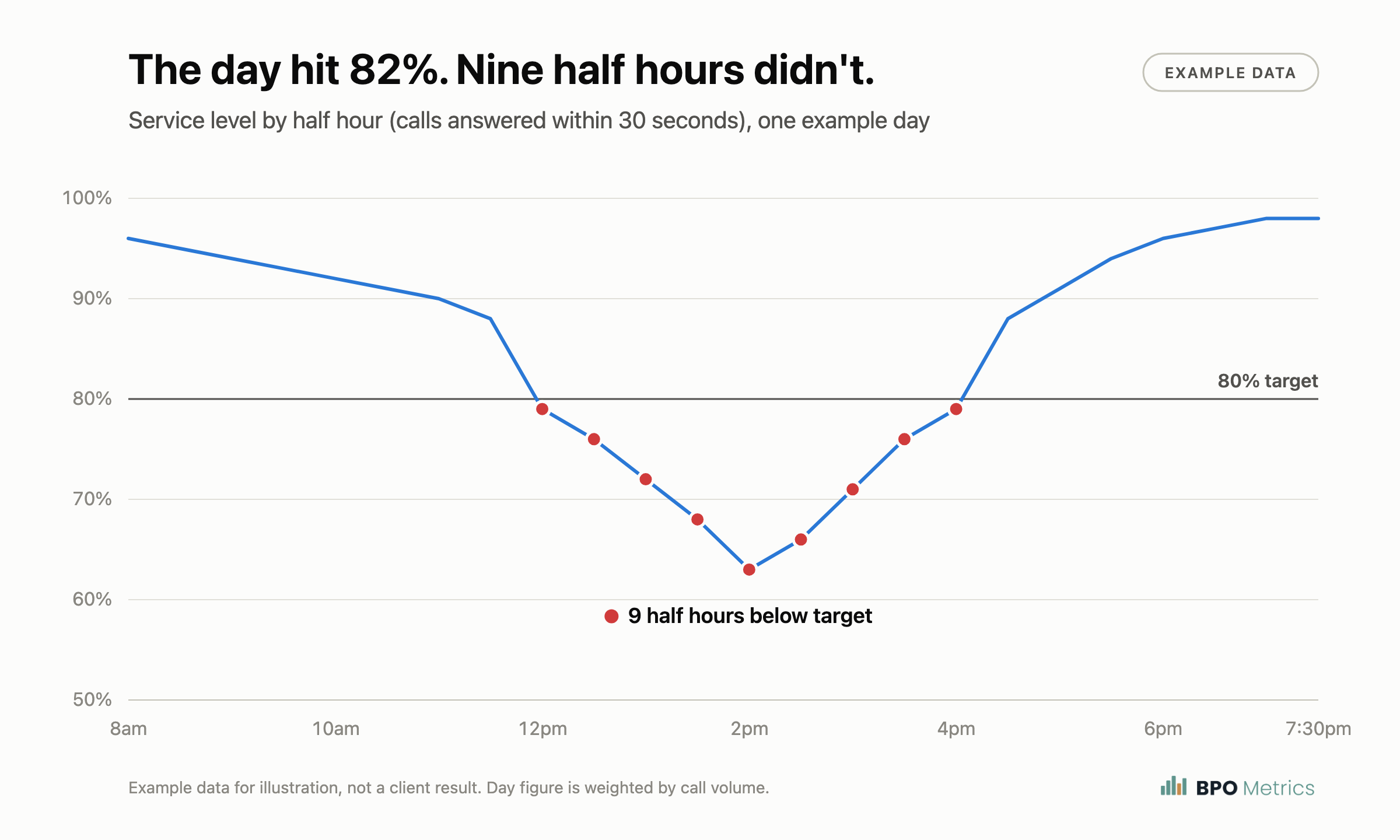
If your contract pays credits for missed service levels, any gap there is money.
Liquidation. A great liquidation rate can hide a weak collections vendor. Easy accounts make anyone look good. Before you trust the number, ask for:
- The rate broken out by how old the accounts were when placed
- What happened to every account that came back
- How often they actually reached the right person
- Dollars collected on the hard accounts, not just the total
If a vendor can't break the number down, that tells you something too.
What I put together this week
I moved my sample reports onto bpometrics.com so they're easy to find:
- A sample audit report that shows what a findings readout looks like when vendor numbers get checked against raw data and the contract: bpometrics.com/audit/sample
- Two example dashboards, one for a call center and one for collections. They use made-up data, so you can see how the reporting is laid out without anyone's real numbers: bpometrics.com/bpo-sample and bpometrics.com/collections-sample
What's one number your vendor sends you that you've never checked?
Hit reply and tell me. It might be next week's issue.
If you want someone to run these checks on your own vendor data, start with the sample audit report at bpometrics.com/audit/sample.
Scott
P.S. If someone else on your team signs off on vendor invoices, forward this to them.